TWO-PHOTO DUET
58th Floor AI Video Generator
Use two portraits to put yourself and a friend into a 15-second 58th Floor AI video, following the teal-studio reference performance. See the real sample before you start.
Create your video
1Left performer
One adult per photo, face visible and evenly lit. JPG, PNG or WebP, up to 10 MB.
2Right performer
3Length
Original · COLORS / Anderson .Paak & Cordae
Watch the original COLORS performanceIndependent tool. Original reference and AI test sample are labeled separately.
58th Floor AI at a glance
- Input
- Two separate adult portraits: photo 1 left, photo 2 right.
- Output
- 15-second vertical MP4, 9:16, 480p by default, with the original soundtrack restored.
- Credits
- 15 credits per video. No free generation credits at signup.
- Account
- A browser and an account; no editor installation or custom prompt required.
How much does a video cost?
Credit pricing starts at $9.90 for 20 credits. One 15-second video uses 15 credits, so that pack covers 1 full video with 5 credits left. Prices are in USD; taxes may apply at checkout.
View all credit packs and refund termsHow to make a 58th Floor AI video
Choose two portraits
Use one clear, evenly lit adult face per image. Assign photo 1 to the left performer and photo 2 to the right. Get permission from both people.
Use the performance template
The built-in 58th Floor video supplies the movements, teal set, microphone and four-shot sequence. You do not need to upload a performance or write a prompt.
Review before sharing
Check both faces, hands, cuts and audio in the complete MP4. Generation can change small gestures or expressions. Identify the result as AI-generated when you share it.
58th Floor AI example: two photos to a duet
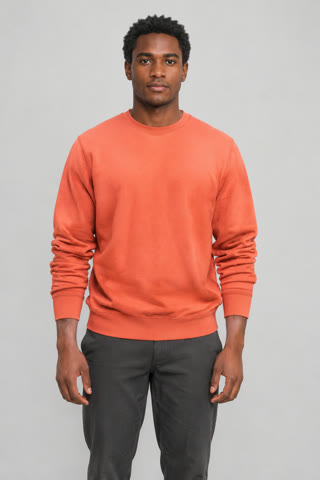
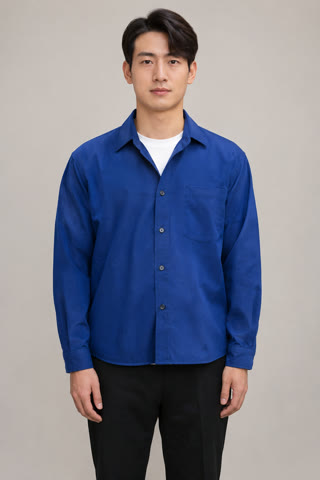
A real Wan 3.0 result generated through this website using two AI-generated adult portraits. The complete 15-second MP4 was saved and downloaded with the original soundtrack restored automatically. This example has no manual video edits.
The two identities and four-shot sequence are retained in this sample. Fine gestures and expressions still differ. It is one test, not a guarantee for every photo.
Content and sample reviewed 2026-11-05.
Prepare your two photosWhat is 58th Floor?
58th Floor is a song performed by Anderson .Paak & Cordae. The 58th Floor AI trend recreates the look of their A COLORS SHOW performance: two people trading rap lines in a teal studio around a hanging microphone. This site focuses on that two-person video task.
For “58th Floor AI with friend” or “58th Floor AI with two photos,” start with two separate portraits. The goal is to replace the performers while following the original scene, not to create an unrelated rap video.
Read the full 58th Floor trend guideWhat is 58th Floor AI?
58th Floor is a song performed by Anderson .Paak & Cordae. The 58th Floor AI trend recreates the look of their A COLORS SHOW performance: two people trading rap lines in a teal studio around a hanging microphone. This site focuses on that two-person video task.
Read the song and trend backgroundHow do I make a 58th Floor AI video with a friend?
Prepare two separate portraits, assign left and right, sign in and use the built-in performance reference. Purchase credits to generate, then review the complete video before downloading and sharing.
Photo requirements and step-by-step tutorialCan I use a group photo, one photo or a pet?
This version requires 2 separate adult portraits. Group photos, collages, single-person and pet modes are not supported. Use JPG, PNG or WebP, up to 10 MB per file, with no covered faces or heavy filters.
Is 58th Floor AI free?
Viewing the sample and choosing photos are free. Generating a video uses 15 credits, and signup does not include free generation credits. Buy a credit pack to generate your video.
How much does a video cost?
Credit pricing starts at $9.90 for 20 credits. One 15-second video uses 15 credits, so that pack covers 1 full video with 5 credits left. Prices are in USD; taxes may apply at checkout.
Does the video include the original song?
Yes. The built-in performance reference includes audio, and the original soundtrack is restored automatically after generation. The complete video and audio have been verified through the live website. Check the music rules of the platform where you share your result.
Will the actions and lip movements match exactly?
The reference guides body movements, camera framing and cuts; the photos define the two identities. The tested result follows the main action sequence, but hands, expressions and timing can vary. Frame-for-frame motion or perfect lip sync is not guaranteed.
What happens if generation fails?
A task marked as technically failed returns its charged credits automatically. This is a credit refund, not a cash refund or an automatic free rerender. A completed clip that differs aesthetically is not the same as a technical failure; cash refund conditions are in the refund policy.
Do I need CapCut or a template download?
No editor installation is required for this browser workflow. This is an AI video generator, not a downloadable CapCut project or a lyrics website. To watch the original performance, use the official COLORS source link.
Are my photos and videos public?
Uploads are not public gallery entries. Photos are scheduled for deletion after 7 days; generated videos are kept for 30 days. Public sharing is optional and must be enabled from your account. The video provider receives the inputs needed to render the result.
Is this the official COLORS tool?
No. 58th Floor AI is an independent tool with no affiliation or endorsement from COLORS or Anderson .Paak & Cordae. The original video is credited as a reference, not presented as our generated output.